How Long Does an AirTag Battery Last? A Year, With Caveats
Apple rates AirTag for more than a year on one CR2032. Real range is 8 to 18 months. How to read the low-battery alert and swap the coin cell in a minute.
On this page 7 sections
- How long does an AirTag battery last in real use
- What battery does an AirTag use, and what it costs
- What drains an AirTag battery faster
- The low-battery notification: how the alert works
- How to replace an AirTag battery, step by step
- Why a new battery can still show as low
- When to replace it, and when to just retire the tag
You reach for your keys, glance at the Find My app, and there it is: a low-battery icon next to the AirTag you clipped on maybe a year ago and forgot about. The tag has been quietly doing its job the whole time, and now it wants a fresh coin cell.
The short version is the one Apple prints on the box. An AirTag runs “more than a year” on a single battery, and when it dies you swap the coin cell yourself in under a minute. The longer version is where the useful detail lives: how far past a year you can expect, what drags the number down, and how to avoid the one battery mistake that leaves you thinking a brand-new AirTag is broken.
Key takeaways. An AirTag uses one CR2032 3-volt lithium coin cell, not a rechargeable pack. Apple rates it for more than a year; real-world life runs 8 to 18 months depending on how often the tag is pinged and how cold it gets. Your iPhone notifies you when the battery is low, with several weeks of margin left. Replacement takes under a minute and costs a couple of dollars. The one trap: some bitterant-coated CR2032 batteries do not work in an AirTag, so buy a plain, uncoated cell.
How long does an AirTag battery last in real use
Apple’s official rating is “more than a year” of everyday use. That figure assumes what Apple calls four Play Sound events and Precision Finding uses per day, which is more interaction than most tags ever get. The AirTag on a spare-key ring you check twice a month will comfortably beat that rating.
Here is the honest range once you factor in how people use tags:
| Usage pattern | Battery life | Main drain |
|---|---|---|
| Pinged often (keys, daily bag, frequent Precision Finding) | 8 to 14 months | Bluetooth chatter and speaker use |
| Mostly stationary (suitcase, bike, car) | 14 to 18 months | Minimal; Precision Finding and Play Sound rarely fire |
| Stored somewhere cold (unheated car through winter) | 4 to 8 months | Lithium coin cells lose capacity in the cold |
Keys you locate a few times a week, or a wallet you buzz when it slides into the couch, land in the 8-to-14-month range. A suitcase tag or one zip-tied inside a car barely triggers Precision Finding or Play Sound, so it drifts toward 18 months. The outlier is cold: an AirTag that lives in a car through a Chicago or Denver winter drains far faster than the same tag indoors.
There is no charging and no maintenance in between. The AirTag has no port, no cable, no dock. It broadcasts, it sleeps, and about once a year it asks for a new coin cell. If you run several tags, a useful habit is to write the install month on the inside of the cover with a fine marker, so you are never guessing which one is oldest.
What battery does an AirTag use, and what it costs
The AirTag runs on a CR2032, a 3-volt lithium coin cell roughly the diameter of a US nickel. It is one of the most common batteries on earth. The same cell powers car key fobs, bathroom scales, kitchen scales, LED tea lights, and the clock chip on most computer motherboards. That ubiquity is the good news: you do not need a special Apple part. Any pharmacy, supermarket, hardware store, or gas station stocks CR2032 cells, and a four-pack from Duracell, Energizer, or Panasonic runs about $6 to $10 on Amazon.
The math on ownership is friendly. An AirTag is $29 from apple.com, or $99 for a four-pack, and after that a replacement CR2032 costs about the price of a coffee once a year. Over five years, a single AirTag plus its coin cells costs less than $45 total, with no subscription. That is the whole appeal of the crowd-sourced Find My model versus a cellular GPS tracker, which trades the yearly coin-cell swap for a monthly bill. If you want the fuller picture of how the tag talks to the network in the first place, the complete Find My guide covers it.
What drains an AirTag battery faster
Battery brand alone swings AirTag life by roughly 2.5 times, more than most people expect. That, along with temperature and how often the tag gets pinged, are the three things that move the number.
Battery brand. In independent testing, the longest-lasting CR2032 outran the worst by roughly 2.5 times in the same tag. Coin cells are not interchangeable in the way the packaging implies. A quality name-brand lithium cell from Duracell, Energizer, Panasonic, or Sony holds its rated capacity; a bargain multipack from an unknown brand can be half-empty out of the wrapper. For a device you touch once a year, paying for the good cell is the easiest win available.
Temperature. Lithium chemistry hates the cold. Apple rates the AirTag for operation from minus 20 to 60 degrees Celsius (minus 4 to 140 Fahrenheit), but “operates” and “holds full capacity” are different claims. A tag in a glovebox at minus 15 will report a lower level and die months sooner than the same tag on your keys indoors. Heat matters too, though less: a tag baking on a car dashboard in an Arizona summer ages faster than one at room temperature.
How often it gets pinged. Every Precision Finding session lights up the ultra-wideband radio, and every Play Sound fires the built-in speaker. Both are far more power-hungry than the quiet Bluetooth heartbeat the tag sends the rest of the time. A tag you Precision Find and buzz several times a day will not last as long as one you locate on a map once a week. This is also why a tag on a genuinely lost item, being searched for constantly, drains quickly right when you need it most.
The low-battery notification: how the alert works
iOS pushes a low-battery notification when AirTag cell voltage falls toward 2.6 volts, leaving several weeks of working margin before the tag goes silent. A small low-battery icon appears next to the tag’s name in the Find My app at the same time.
The alert is not a last-gasp warning. It is a “swap it this week” prompt, not a “your tag is already dead” one. There is no reason to panic-order same-day batteries; a CR2032 from the corner store over the weekend is fine.
To check a tag’s status yourself without waiting for the alert:
- Open Find My on your iPhone or iPad.
- Tap the Items tab along the bottom.
- Select the AirTag. If the battery is low, a low-battery warning shows under the item name.
If you run a fleet of tags across bags, bikes, and keys, glancing at the Items list every couple of months catches a fading tag before it strands you. A dead AirTag stops appearing in the network, which looks identical to a tag that has genuinely gone missing, so heading it off is worth the ten seconds.
How to replace an AirTag battery, step by step
The swap needs no tools and takes under a minute. The steel back is both the battery cover and the twist mechanism.
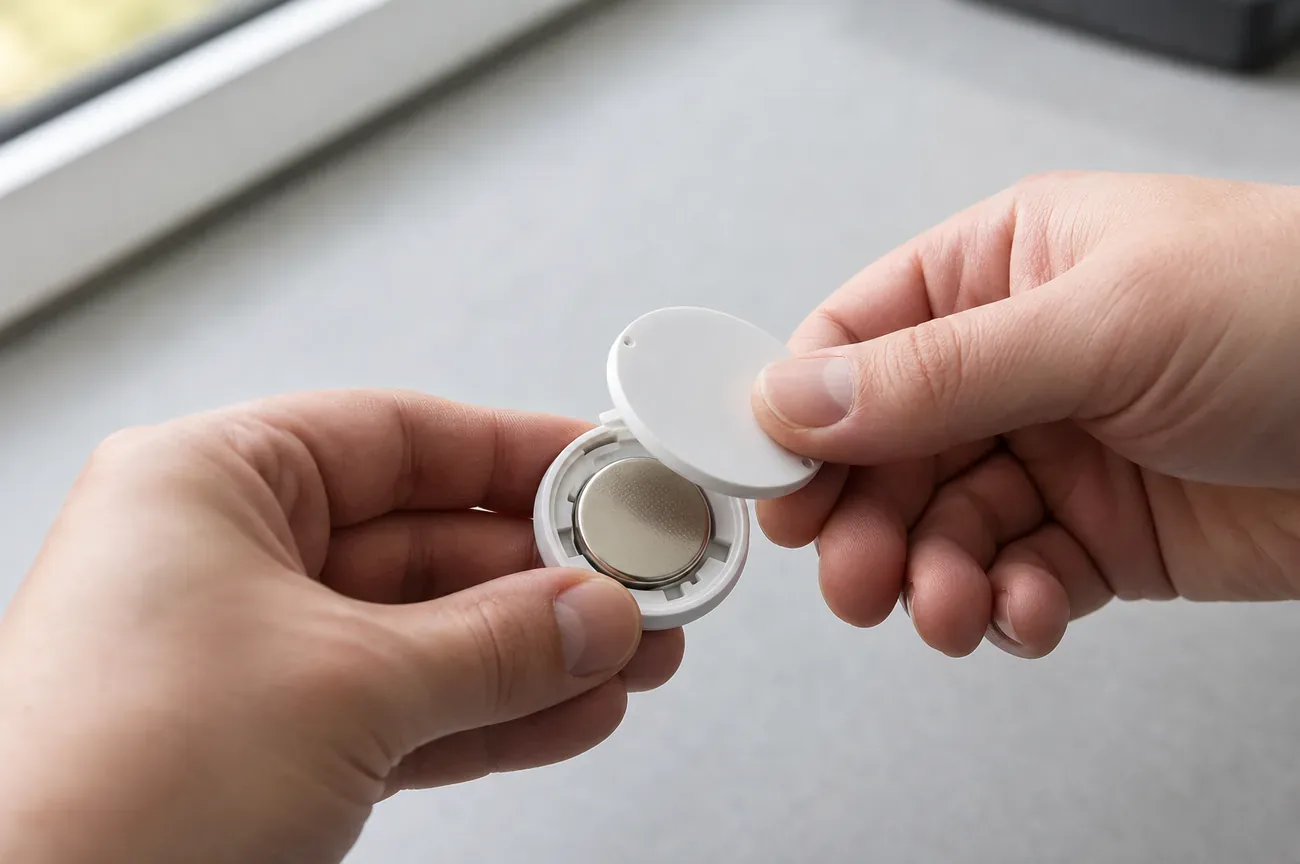
- Open the cover. Hold the AirTag in one hand and press down firmly on the polished stainless-steel back with the other. With the pressure still on, rotate the cover counterclockwise until it stops turning, then lift it straight off. It needs a real push; the cover is designed not to open by accident in a pocket.
- Remove the old CR2032. Tip the AirTag over and the coin cell drops into your hand. Notice the orientation before it falls out: the flat, printed side (the positive terminal) faced up toward the cover.
- Insert the new battery. Drop in a fresh CR2032 with the positive side facing up, matching what came out. Press it down until you hear a chime. That sound is the AirTag confirming the battery connected. No chime means the cell is not seated, or it is a type the tag rejects (more on that next).
- Reseal the cover. Line up the three tabs on the underside of the cover with the three slots on the body, press down, and rotate clockwise until it stops. Done. The tag rejoins the Find My network on its own.
You do not need to re-pair the AirTag or reset anything. It keeps its name, its owner, and its place in your Find My list through the swap.
Why a new battery can still show as low
A bitterant coating on the new CR2032, not a broken AirTag, is almost always the cause. This is the single most common “my AirTag is broken” complaint people run into right after a battery swap.
Many CR2032 cells now ship with a bitterant, a bitter-tasting coating on the battery meant to make a child spit it out instead of swallowing it. It is a genuine safety feature, and coin-cell ingestion is a real medical emergency worth taking seriously. But the coating can also sit between the battery and the AirTag’s contacts. Apple explicitly warns that CR2032 batteries with bitterant coatings may not work in an AirTag.
So if you install a fresh cell and the tag immediately reports low, or never chimes:
- Buy a CR2032 whose packaging says compatible with Apple AirTag, or a plain uncoated cell from a major brand.
- Reseat the battery and confirm you hear the connection chime.
- Wipe both the battery faces and the tag’s metal contacts with a dry cloth before reinstalling.
Duracell’s standard CR2032 and Energizer’s uncoated line are safe bets. The bitterant versions are usually labeled as such on the front of the pack.
One more question people ask: can you use a rechargeable LIR2032 instead? Skip it. Rechargeables put out about 3.6 volts fresh, above the 3 volts the AirTag is built around, and they hold a fraction of the capacity, so life collapses from a year to weeks. The disposable CR2032 is the right cell.
When to replace it, and when to just retire the tag
Replace the battery when the low-battery notification arrives, or when the Find My Items screen shows the warning icon. Waiting past that point risks the tag going dark on the one day something walks off with it.
There is a case for retiring an AirTag rather than feeding it new cells, though it is rare. The AirTag has no moving parts and no wear-out mechanism beyond the battery, so a five-year-old tag with a fresh CR2032 performs like a new one. The exception is physical damage: a cracked case that no longer seals loses its IP67 water resistance, and a tag that has been chewed, dropped hard, or soaked may not hold the battery contact reliably. If a tag repeatedly reads low across two known-good batteries, the tag itself is likely the problem, and at $29 a replacement is cheaper than the time spent troubleshooting.
For everything else, the AirTag is close to maintenance-free. One coin cell a year, a one-minute swap, no subscription. If you are still deciding whether the AirTag is even the right tracker for what you want to keep tabs on, the head-to-head with Tile, SmartTag, and Chipolo lays out where each one wins, and if you have started seeing tracker alerts on your own phone, what an unknown AirTag alert means is the place to start.
Questions & answers
Things readers ask about this
7 questions · updated Jul 2026